
Marrow Coach
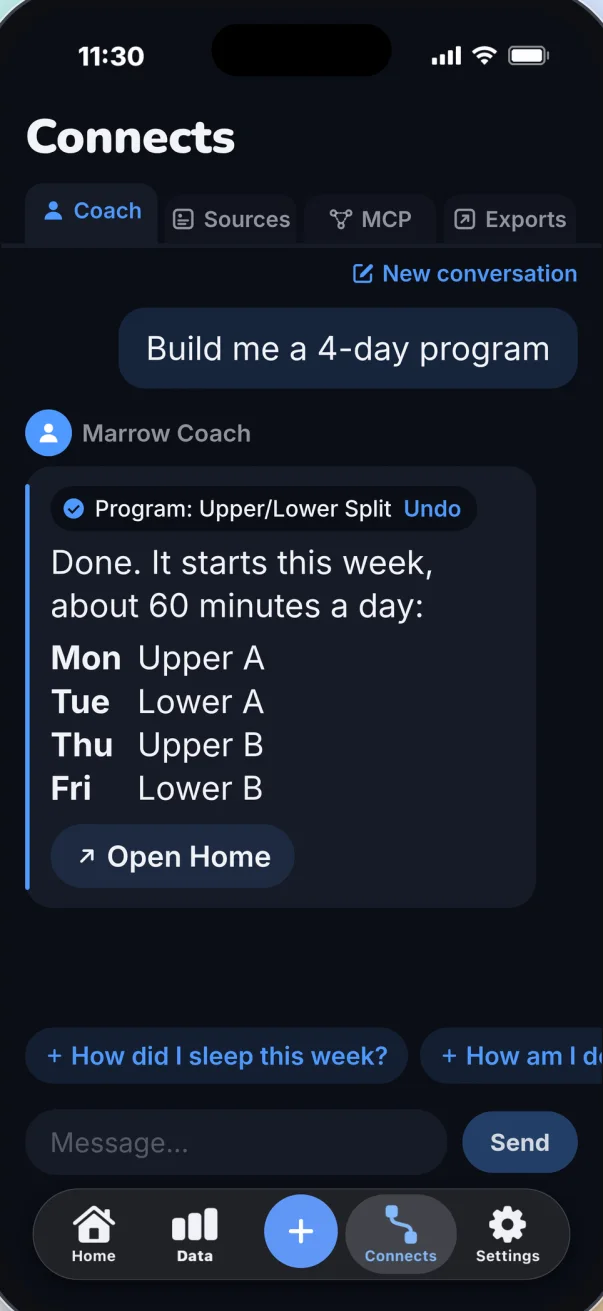
Marrow Coach is an AI health and fitness coach inside the Marrow app for iPhone. You ask it about your week in plain words and it answers from your own Apple Health data, meals and workouts. You tell it what you ate or lifted and it logs it, with Undo. Ask for a workout plan and it builds one for your gym and starts it once you tap Apply.
What it does
- Answers from your data. It reads today's brief, your last days of sleep, steps, heart rate and any other metric, your food diary, your workouts, your lifts and your own baselines, then answers. Each thing it reads shows as a step under the answer, so you can see where a number came from.
- Logs for you. Meals, water, weight, workouts, strength sets and sleep. It can also change an entry you made. Every log has Undo, and everything it logs is written to Apple Health like anything else you log in Marrow.
- Sets things up, after you tap Apply. Daily targets, your goal, which sections of the app are on, the cards on the Data dashboard, and a workout program. It shows what it is about to change on a card and waits for your Apply.
- Takes you to the right screen. When a page would help more than words, it offers a button that opens it.
Things to ask, and what happens
| You say | What Marrow Coach does |
|---|---|
| "I had two eggs and toast" | Logs a meal with its calories and nutrients. Undo sits next to it. |
| "Log 500 mL of water" | Adds the water to today. Undo sits next to it. |
| "I weighed 181 this morning" | Logs your weight. |
| "Bench press, 185 for three sets of 8" | Logs a strength session with each set. |
| "I ran for 30 minutes" | Logs a workout. |
| "How did I sleep this week?" | Reads your sleep for the week and answers from it. |
| "How am I doing today?" | Reads today's brief and tells you where the day stands. |
| "Build me a 3 day program for my gym" | Shows a card with the plan: the goal, 3 days a week and the minutes a session. Tap Apply and it builds the program from the equipment in your gym and makes it your active program. |
| "Set my protein to 160 g" | Shows the new target on a card. It changes when you tap Apply. |
| "I want to lose weight" | Offers to change your goal and recompute your calories and macros. Apply first. |
| "Add HRV to my dashboard" | Offers the change to the Data tab. Apply first. |
A program can train for size, strength or both, on 2 to 6 days a week, in sessions of 20 to 120 minutes, as a full body, upper and lower or push, pull and legs split, for 3 to 12 weeks. Say what you want, or let it choose.
What it can read
- Today's brief, and a summary of your last days.
- Any metric Marrow has from Apple Health, day by day: sleep, steps, resting heart rate, HRV, weight and the rest.
- Your workouts, your strength log set by set, and your workout programs.
- Your food diary, with each food and its nutrients.
- Your baselines, which are your own normal for each metric.
- Your goal and daily targets, your app sections and your Data dashboard.
It reads only what an answer needs, for example your last seven days of sleep, or today's meals.
What it will not do
- No payments. It cannot buy, change or cancel Marrow Pro, and it never sees a purchase.
- No connections or exports. It can open the right Connects tab for you, but it cannot add, change or remove a connection, an automation or an export.
- No deleting. It can add entries and change them. It never deletes one.
- No silent changes. Targets, goals, app sections, the dashboard, a new program and edits to an entry wait for your Apply.
- No medical advice. Marrow is a wellness tool. The coach does not diagnose or treat anything.
How to turn it on
- Install Marrow on an iPhone with iOS 17 or later.
- Open Connects. Coach is the first of its four tabs, before Sources, MCP and Exports.
- Tap Turn on Marrow Coach. The coach stays off until you do.
- Tap one of the suggestions over the message field, or type your own question.
To turn it off again, open Settings, then Customization, and switch off Marrow Coach.
Marrow Coach is part of Marrow Pro. Every new install has Pro for its first 3 days, so you can try the coach with nothing to buy and nothing to cancel.
Privacy
These are the facts from the privacy policy, in short:
- The coach is off until you turn it on in the app.
- When you ask a question, the question and only the numbers an answer needs are sent to Marrow's server and forwarded to Google's Gemini API, which produces the answer.
- Marrow uses a paid Google API tier. Under it, Google does not use the content to train or improve its models.
- Marrow's server holds the request in memory and discards it. It keeps no content from the conversation, only timing, size and token counts for the fair-use limit.
- The conversation lives on your phone for the session and is not stored anywhere else.
- The request carries a random device identifier for the fair-use limit only. No name, no Apple ID, no account.
- Logging and changes happen on your phone, and every change can be undone in the app.
Marrow Coach or your own AI?
Marrow offers both. Marrow Coach lives inside the app and needs no setup. Cloud MCP gives ChatGPT, Claude or Gemini a link to the same data, so you can ask in the AI you already use, and Local MCP does it free for agents on your own network.
| Marrow Coach | Your AI over Cloud MCP | |
|---|---|---|
| Where you ask | In Marrow, on the Coach tab | In ChatGPT, Claude or Gemini |
| Setup | One tap | Paste a link into your AI and approve the sign-in on your phone |
| Logs for you | Yes, with Undo | Yes, once you turn on Allow AI write |
| Builds a workout program in the app | Yes, after Apply | No |
| Changes app sections and the dashboard | Yes, after Apply | No |
| Needs another AI subscription | No | Depends on the AI. Claude works on its free plan |
| Plan | Marrow Pro | Marrow Pro |
Questions
Is there an AI coach that works with Apple Health?
Yes. Marrow reads your Apple Health data on the iPhone, and Marrow Coach answers from it: sleep, steps, heart rate, HRV, weight, workouts and what you ate. What it logs for you is written back to Apple Health.
Can I log food by chatting?
Yes. Type what you ate, for example "a chicken burrito and a diet soda", and the coach logs the meal with calories and nutrients. Undo removes it. Outside the coach, Marrow also logs food by photo, voice, barcode and search.
Can it build a workout plan?
Yes. Ask for a program and say how many days a week you train. It uses the equipment you set up for your gym, shows the plan on a card, and builds and starts the program when you tap Apply. The program then lives in Workouts, where the logger shows last time's numbers for every set.
Is Marrow Coach free?
It is part of Marrow Pro, and every new install has Pro for its first 3 days. Marrow itself is free, including food and workout logging, every Apple Health metric and the exports. Plans are on the Pro page.
Does it work offline?
No. The coach needs a connection for each answer. Your data stays on the phone either way, and the rest of the app does not depend on the coach.
Is it a personal trainer or a doctor?
Neither. It is software that reads your numbers and helps you log and plan. It does not replace a trainer who watches you move, and it does not give medical advice.
Is there a limit?
There is a daily fair-use limit. If you reach it, the coach says it is resting for the day and answers again tomorrow.
Related: Workouts in Marrow · Marrow Pro · Cloud MCP for ChatGPT, Claude and Gemini · logging food to Apple Health with AI · Apple Health in ChatGPT · all guides