
A free MyFitnessPal alternative for iPhone
MyFitnessPal is one of the best-known calorie counters. In it, barcode scanning, meal scan, voice logging and exporting your own data are Premium features. Marrow is a free calorie counter for iPhone that does all four on its free plan (the scanning and voice within three AI logs a day), with no account and no ads. We make Marrow, so read this as our side of it. We have tried to be fair, including about where MyFitnessPal is the better app.
The short answer
- Marrow suits you if you use an iPhone, want barcode and photo logging without a subscription, want your diary as a file whenever you ask, and would like your workouts and Apple Health numbers in the same app.
- MyFitnessPal is still the better pick if you need Android or a web version, log a lot of restaurant meals from its database, or use its meal plans, recipes, fasting tracker or community.
Side by side
| MyFitnessPal | Marrow | |
|---|---|---|
| Price | Free; Premium is $19.99 a month or $79.99 a year | Free; optional Pro is $4.99 a month, $34.99 a year or $59.99 once |
| Account | Required | None |
| Ads | In the free version | None |
| Barcode scan | Premium | Free, as one of three AI logs a day; unlimited with Pro |
| Photo meal scan | Premium | Free, as one of three AI logs a day; unlimited with Pro |
| Voice logging | Premium | Free, as one of three AI logs a day; unlimited with Pro |
| Food search | More than 20.5 million foods, restaurant dishes included | Open Food Facts online, 9,047 USDA foods offline, and your own foods; unlimited |
| Goals | Custom calorie and nutrition goals; by gram, by day and by meal in Premium | Recommended or custom calorie and macro targets, free |
| Your data out | Premium: three CSV files by email | Free: CSV, JSON and GPX files, scheduled pushes, and an MCP server for AI agents |
| Apple Health | Writes meal summaries and most nutrients; reads exercise and sleep; weight both ways | Writes every food by name and every workout; reads 172 data types |
| Workouts | Logs workouts and steps; exclusive workout routines in Premium | A program built from your equipment, set logger, rest timer, 777 exercises, muscle map |
| Apple Watch | Yes | Yes |
| Android, iPad, web | Yes | No, iPhone only |
| Meal plans and recipes | Saved meals and recipes; meal plans and 1,500+ recipes in Premium+ | Your own foods only |
| Fasting tracker | Premium | No |
| Community | Yes | No |
| App Store privacy label | Identifiers and usage data may be used to track you | No data used to track you |
Checked October 2026 against MyFitnessPal's US App Store listing, its Premium page and its help center (links under Sources). Prices are in US dollars and can differ by country.
What free means in each app
MyFitnessPal's free version lets you search its database, see a full nutrition breakdown, log workouts, steps and water, and set calorie and nutrition goals. Premium, at $19.99 a month or $79.99 a year with a 7-day trial if you have never had one, adds barcode scan, meal scan and voice logging, removes the ads, and adds data export, intermittent fasting, net carbs, and goals by gram, by day and by meal.
In Marrow, searching foods, Quick add and creating your own foods are unlimited and free. The AI ways in (meal scan, attaching a photo, barcode, a typed description and voice) share an allowance of three a day, which resets at your midnight. The rest is free too: the workout program and logger, the Apple Watch app and widgets, every Apple Health metric, exports and the MCP server. Marrow Pro ($4.99 a month, $34.99 a year or $59.99 once, with a 7-day trial on monthly and yearly) removes the daily limit and adds Connect your AI and campus dining menus.
Logging food
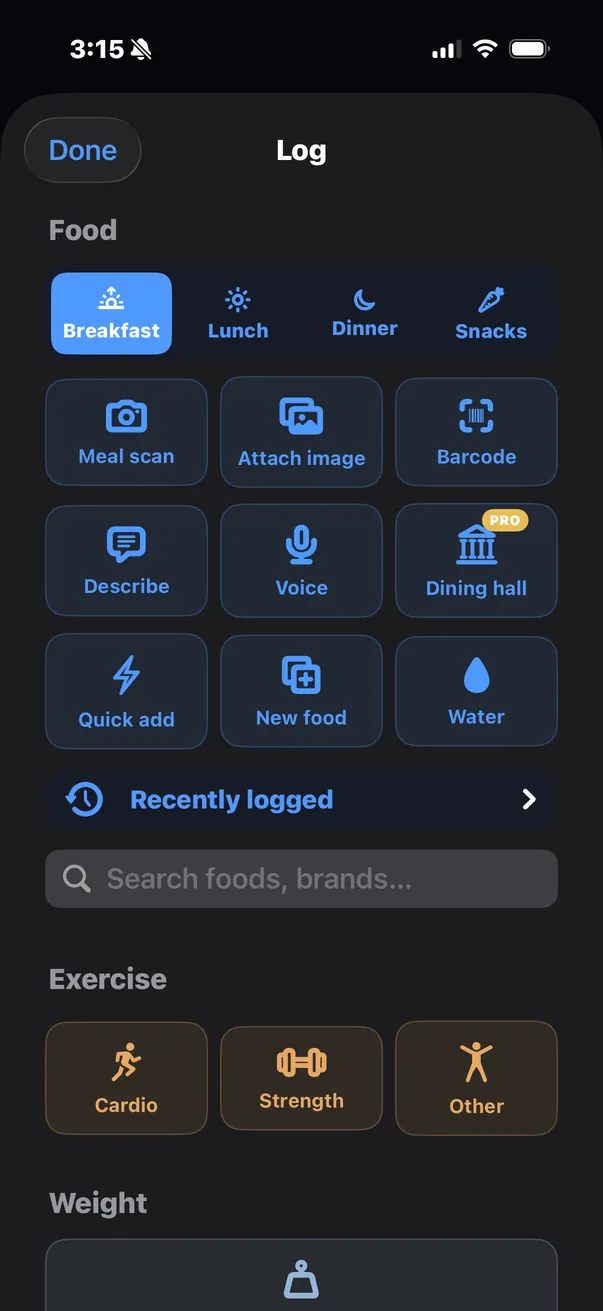
Marrow's Log sheet puts every way in on one screen. A meal scan names each food on the plate, estimates the portion and logs it straight away; a banner then shows what went in, with Edit to change a portion, untick something it got wrong, or move it to another meal. Barcodes are looked up in Open Food Facts. Search covers Open Food Facts online and 9,047 USDA foods built into the app, which work with no signal. Each entry carries 39 nutrients, and your calorie and macro targets come from your body stats, activity and weekly goal unless you set your own.
The honest gap is the database. MyFitnessPal lists more than 20.5 million foods, restaurant dishes included. If most of what you eat comes from chain restaurants and you log it by name, MyFitnessPal will find more of it. Marrow's answer is the photo scan and the typed description, which work on any plate but are estimates.
Your data
MyFitnessPal's export is a Premium feature: you choose a date range and it emails three CSV files (meal-level nutrition, progress such as weight, and exercise). Free accounts can print a report or share their diary instead.
Marrow has no account, so there is nothing to email. The Export tab makes a CSV, JSON or GPX file for any range and hands it to the share sheet; automations push the same data to a URL you choose on a schedule; and AI agents can read it over MCP. All of that is free. The files page lists every column.
Apple Health and the Apple Watch
Both apps work with Apple Health. MyFitnessPal writes meal summaries and most nutrients to it, reads exercise and sleep from it, and syncs weight both ways. Marrow writes every food you log, by name and with its nutrients, and every workout. It reads 172 Apple Health data types, from steps and sleep stages to heart rate variability and cycle tracking, each with a chart and a history.
Both have an Apple Watch app. MyFitnessPal's shows the calories and nutrients you have left and your steps, adds water, quick-adds calories, and has complications for calories, carbs, fat and protein. Marrow's shows calories left and macros, logs water in one tap, repeats a recent meal, and takes a spoken meal that your iPhone turns into entries, with complications for calories and water. More on Marrow on Apple Watch.
Workouts
MyFitnessPal logs workouts and steps and shows how exercise changes your calorie goal; Premium adds exclusive workout routines. Marrow treats lifting as half the app: it builds a program from the equipment you have, shows last time's numbers as you log each set, runs a rest timer, and maps which of 22 muscles your week has covered, with 777 exercises to choose from. It is all free. See Workouts.
Moving over
- Your history. If MyFitnessPal was connected to Apple Health, it has been writing meal summaries and most nutrients there. Marrow's calorie and nutrient charts count anything any app writes to Apple Health, so up to three years of that history shows up as daily totals once you let Marrow read nutrition. Individual foods do not come across, and Marrow cannot import MyFitnessPal's CSV export.
- Weight. MyFitnessPal syncs weight with Apple Health and Marrow reads it from there, so weigh-ins you logged in MyFitnessPal while it was connected carry over.
- Targets. In Marrow's Goals, choose Recommended to have calories and macros worked out for you, or Custom to type in the numbers you already use.
- One app per meal. If you run both for a while, log each meal in only one of them. Marrow's charts include what other apps write to Apple Health, so a meal logged in both counts twice.
Where MyFitnessPal is stronger
- It runs on Android, iPad and the web as well as iPhone, with one account across all of them. Marrow is iPhone only, plus the Apple Watch.
- Its database of more than 20.5 million foods includes restaurant dishes.
- Saved meals and recipes; meal plans with grocery delivery and 1,500+ recipes on Premium+; intermittent fasting and net carbs on Premium.
- Friends and a community.
- Connections with more than 35 trackers, watches and apps, and a built-in AI nutrition coach.
Where Marrow is different
- No account and no ads. Its App Store privacy label lists no data used to track you.
- Barcode, photo, typed and spoken logging on the free plan, three a day.
- Free export in three formats, scheduled pushes to your own URL, and an MCP server for AI agents.
- A full workout module, and all of Apple Health in one place.
- With Pro, Connect your AI: ChatGPT, Claude or Gemini read your diary and, if you allow it, log meals for you.
Also compared: Cal AI · Health Auto Export · Apple Health in ChatGPT · all guides
Sources
- MyFitnessPal on the App Store: features by tier, food count, devices, ads, privacy label
- MyFitnessPal Premium: prices, the 7-day trial, free versus Premium
- MyFitnessPal Premium features
- Export your nutrition, progress, and exercise data
- Apple Health connection and syncing
- MyFitnessPal Apple Watch app
Checked October 2026. If something here has changed, write to [email protected] and we will correct it. MyFitnessPal is a trademark of its owner. Apple Health and Apple Watch are trademarks of Apple Inc. Marrow is not affiliated with, endorsed by or sponsored by either company.