
A Health Auto Export alternative
Health Auto Export has been getting Apple Health data off iPhones for years, and it still does several things Marrow does not. Where the two overlap (files, scheduled exports and access for AI agents) Marrow is free. We make Marrow; here is the comparison as fairly as we can put it.
The short answer
- Health Auto Export is the better fit if you want your data on a Mac, iPad or Apple Vision Pro, send exports to iCloud Drive, Google Drive, Dropbox, MQTT, Calendar or email, drive them from Shortcuts, need medications or ECG voltage data, or want an exporter that collects no data at all.
- Marrow suits you if you want files, scheduled pushes to your own URL and an MCP server without paying, want agents to read your data while your phone is asleep, or would like a calorie counter and workout log in the same app.
Side by side
| Health Auto Export | Marrow | |
|---|---|---|
| Free | Widgets and the statistics dashboard | Files, automations, the MCP server and the self-hosted mirror |
| Paid | Basic, $2.99 once: manual export. Premium, a subscription or $24.99 lifetime: automatic exports, background sync, Sync to Mac, the MCP server | Pro ($4.99 a month, $34.99 a year or $59.99 once) adds only the hosted AI connection, unlimited AI food logging and campus menus |
| Data | 150+ metrics, including workouts, sleep phases, State of Mind, symptoms, cycle tracking, medications, ECG voltage and heart rate notifications | 172 Apple Health types, including sleep stages, State of Mind, symptoms, cycle tracking, ECG results and heart rate events; no medications. Plus Marrow's own meal diary and strength log |
| Formats | CSV, JSON, Markdown, GPX | CSV (wide or long), JSON, GPX |
| Grouping | Any interval from seconds to a year | Daily totals or raw samples |
| Scheduled destinations | REST API, Home Assistant, MQTT, iCloud Drive, Google Drive, Dropbox, Calendar, email | Any URL you choose, as an HTTPS POST with your own headers (Home Assistant, n8n or your own server); up to ten automations |
| Shortcuts | Yes | No |
| MCP server on the iPhone | Premium; the app must stay in the foreground; local network; HTTP or HTTPS | Free; Marrow must stay open; local network or tailnet |
| Agents while the phone sleeps | Not through its MCP server, which stops when the app is backgrounded | Free self-hosted mirror on your own hardware, or the hosted connection with Pro |
| Other devices | iPad, Mac and Apple Vision Pro apps | iPhone and Apple Watch |
| Account | None | None |
| App Store privacy label | Data not collected | Data not linked to you: purchases, a device ID, and photos, audio or health data only for the features that send them |
| Calorie counter and workout log | No | Yes |
Checked October 2026 against Health Auto Export's US App Store listing, healthyapps.dev and its help center (links under Sources). Its FAQ and its App Store listing show different Premium monthly and yearly prices, so we have left those two out.
Pricing, plainly
Health Auto Export's free tier is its widgets and statistics dashboard. Basic, $2.99 once, adds manual export, simple automations with Shortcuts, more detailed metrics, control over aggregation, and workouts with routes. Premium, a subscription or $24.99 lifetime, adds background sync, automatic export to its integrations and Sync to Mac, and its MCP server requires Premium. Every purchase includes Family Sharing, and you can try all of Premium for seven days.
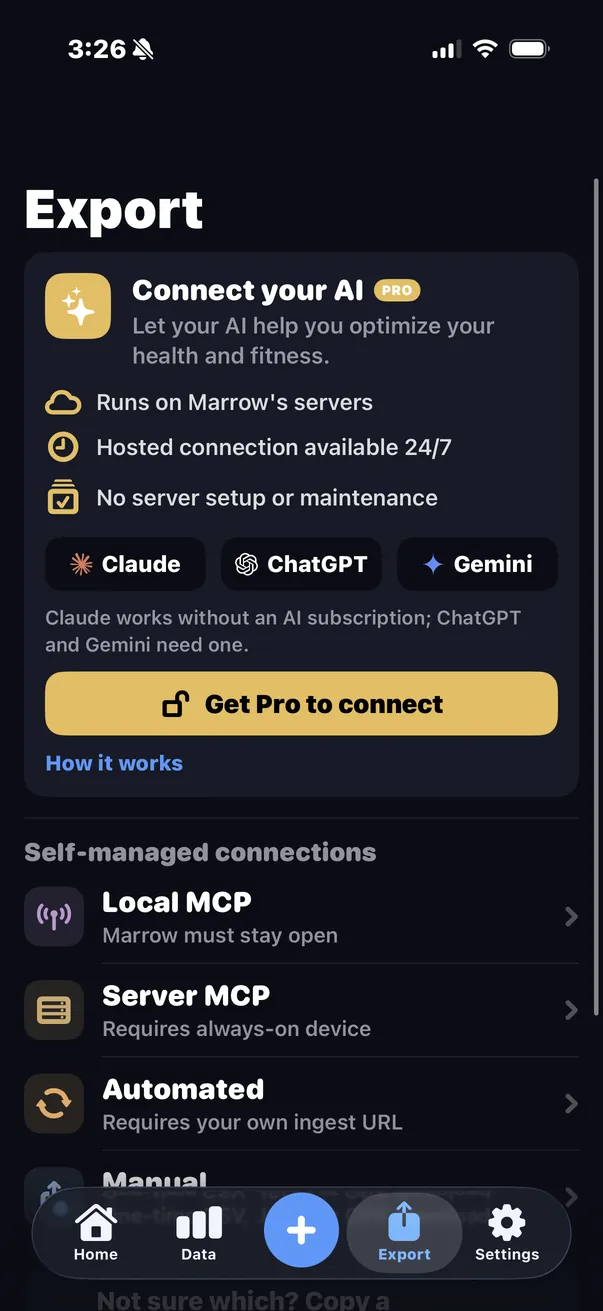
In Marrow, everything on the export side is free: files, automations, the on-device MCP server and the self-hosted mirror. Marrow Pro pays for the parts that cost us money per person: unlimited AI food logging, the hosted Connect your AI, and campus dining menus.
Automations
A Marrow automation is one kind of data (health metrics, workouts, strength log, nutrition diary, or symptoms and mood), one format (JSON or CSV), one date range and one URL, sent as often as you set in minutes, hours or days, with any headers your receiver needs. The daily metrics JSON follows Health Auto Export's layout and field names (name, units and dated qty values, Avg, Min and Max for heart rate, totalSleep and the sleep stages), so a receiver written for that app is a close fit. Two differences to check: dates are plain days rather than full timestamps, and units are always the ones Apple Health stores, named in each record.
One limit applies to both apps, because it comes from iOS: no app can read Apple Health while the iPhone is locked, and iOS decides when background work runs. Health Auto Export's FAQ explains this well. In Marrow, a phone that stays locked all day sends when you next use it, and the "Since last run" range fills in the gap.
AI agents and MCP
Health Auto Export shipped an MCP server before Marrow did. According to its help center it needs Premium, works on your local network, and stops when the app leaves the foreground, so the iPhone has to stay open on it while an agent is connected. It offers a bearer token over HTTP, or HTTPS with a certificate it makes for you.
Marrow's on-device server is free and has the same shape of limit: Marrow must stay open, on your network or tailnet, with a bearer token and seven read-only tools. The difference is what comes next. The free self-hosted mirror (pip install marrow-mcp, paired once by QR code) keeps a copy on hardware you own, which your phone updates in the background, so Claude Code, Cursor or any MCP client can read it while the phone is in your pocket. For ChatGPT, Claude or Gemini with nothing to run, Connect your AI hosts that copy for you on Pro. Setup for each client is in Connect Claude, Cursor or OpenClaw to Apple Health.
Where Health Auto Export is ahead
- Apps for iPad, Mac and Apple Vision Pro, Sync to Mac, and an open-source web app for your own dashboards.
- Many more destinations: iCloud Drive, Google Drive, Dropbox, MQTT, Calendar and email, besides REST and Home Assistant.
- Shortcuts automations, Markdown export, and aggregation from seconds to years.
- Medications, ECG voltage readings, and heart rate notifications with detailed heart rate and HRV data.
- HTTPS on the phone's MCP server.
- An App Store privacy label of Data Not Collected.
Where Marrow is different
- Files, scheduled pushes, the on-device MCP server and the self-hosted mirror are all free.
- AI agents can read your data while your phone sleeps, through the mirror.
- It is also a calorie counter and a workout log, so your meal diary (39 nutrients per entry) and your set-by-set lifts can go out as files and automations and are there for agents to read.
- Every Apple Health metric has a chart and a history in the app, and there is an Apple Watch app.
Also compared: MyFitnessPal · Cal AI · Apple Health in ChatGPT · every way to export Apple Health data
Sources
- Health Auto Export on the App Store: tiers, formats, integrations, devices, privacy label, in-app purchase prices
- healthyapps.dev: automated exports, 150+ metrics, Sync to Mac, open-source dashboards
- Health Auto Export FAQ: tiers and prices, supported data, background and locked-phone limits
- Connect to Server: the MCP server's Premium requirement, foreground requirement and transports
Checked October 2026. If something here has changed, write to [email protected] and we will correct it. Health Auto Export is a trademark of its owner. Apple Health is a trademark of Apple Inc. Marrow is not affiliated with, endorsed by or sponsored by either company.