
A Cal AI alternative for photo calorie counting
Cal AI is built around taking a picture of your meal, and its App Store listing says food scan results require a subscription. Marrow logs meals from a photo too, gives you three AI logs a day without paying, and keeps the rest of the app free. We make Marrow; this is how the two compare, including where Cal AI is ahead.
The short answer
- Marrow suits you if you want to try photo logging before paying for it, would rather not make an account, want your log as a file, or want workouts and your Apple Health numbers in the same app.
- Cal AI is the better fit if you need Android, want your log tied to an account so it follows you to a new phone, want a family plan, or like its depth-sensor portion estimates.
Side by side
| Cal AI | Marrow | |
|---|---|---|
| Photo meal logging | Scan results need a subscription; 3-day free trial | Three AI logs a day free; unlimited with Pro, which has a 7-day trial on monthly and yearly |
| Other ways to log | Barcode, describing the meal, manual search, your own foods and recipes | Barcode, describing the meal in words or by voice, attaching a photo, search (online, plus 9,047 foods offline), Quick add, your own foods |
| Portion estimate | The phone's depth sensor estimates food volume | Estimated from the photo; add a note such as "the bowl is 500 ml" before the scan |
| Account and storage | An account (its FAQ names Apple ID and Google sign-in); your log is kept in Cal AI's cloud | No account; your log stays on your iPhone |
| Devices | iPhone, Apple Watch and Android | iPhone and Apple Watch |
| Export | CSV, JSON and GPX, free | |
| Apple Health | Connects to read your steps; its FAQ does not list what else it reads or writes | Reads 172 data types; writes each meal and workout |
| Workouts | Tracks exercise | Programs built from your equipment, a set logger, a rest timer and a muscle map |
| Languages | English and 14 more | English and 29 more |
| App Store privacy label | Identifiers and usage data may be used to track you | No data used to track you |
Checked October 2026 against Cal AI's US App Store listing, its website and its FAQ (links under Sources). We could not confirm Cal AI's subscription prices from its own pages, so we have left them out rather than guess.
How a photo log works in Marrow
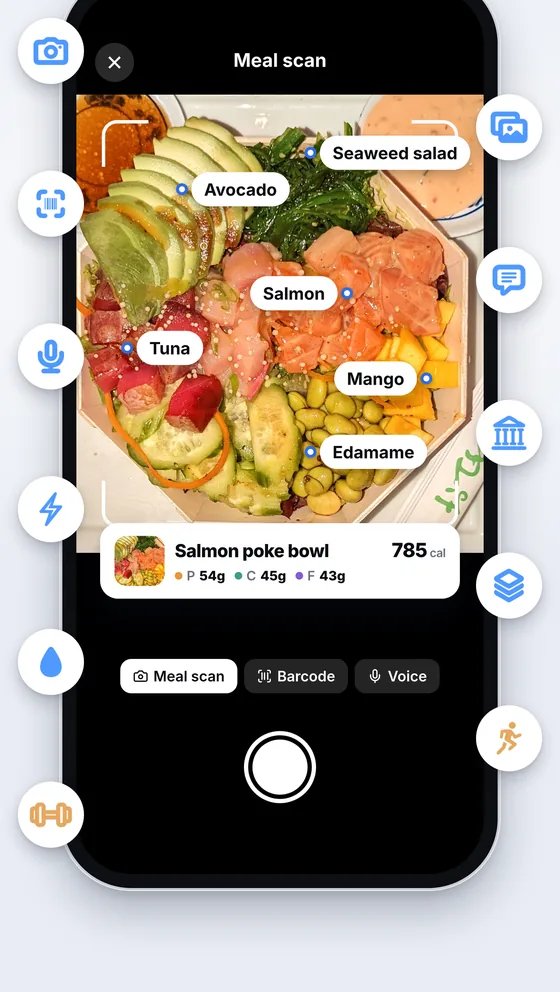
- Open Log and tap Meal scan, or Attach image for a photo you already took.
- If you like, add a line about what the camera cannot see: "two scoops of whey", "cooked in butter", "the bowl is 500 ml". Or skip it.
- Marrow names each food, estimates its portion and nutrients, and logs them straight away.
- A banner shows what went in. Tap Edit to change a portion, untick anything it got wrong, or move it to another meal. Entries stay editable in the diary afterwards.
Each entry carries 39 nutrients and is written to Apple Health under the food's name. Typed and spoken descriptions are logged the same way, and on the Apple Watch you say what you ate and your iPhone works out the foods.
About accuracy
A photo cannot show the oil in the pan, the sauce under the rice or how deep the bowl is, so every photo app gives an estimate. Cal AI's own FAQ puts its accuracy at about 80 percent. We do not publish a number for Marrow. The note before the scan and the edit after it are there because estimates miss, and for packaged food a barcode or a search gets you closer to the label than any photo.
What the free allowance covers
Three AI logs a day, shared between meal scan, attached photos, barcodes, typed descriptions and voice, including voice from the Apple Watch. The count resets at your local midnight, and a try that fails because the service could not be reached is given back. Search, Quick add and New food never count. Marrow Pro ($4.99 a month, $34.99 a year or $59.99 once) removes the limit, and monthly and yearly start with a 7-day free trial.
Where your log lives
Cal AI keeps your log in its cloud under your account, which is why a reinstall or a new phone picks up where you left off. Marrow has no account. Its database stays on your iPhone and is left out of iCloud backups; meals and workouts are also written to Apple Health, and the Export tab makes a copy whenever you want one. When you scan a meal, the photo is re-encoded to strip its location and camera details, sent to Marrow's photo service and on to Google's Gemini API, and not stored. No name, account or health data goes with it. The details are in the privacy policy.
Where Cal AI is ahead
- It runs on Android as well as iPhone.
- Your log is tied to an account, so it comes back after a reinstall or on a new phone.
- It has a family plan.
- It uses the phone's depth sensor to estimate how much food is on the plate.
- It makes a PDF report.
Where Marrow is different
- Photo, barcode, typed and spoken logging on the free plan, three a day, with search and Quick add unlimited.
- No account, and an App Store privacy label with no data used to track you.
- The rest of the app is free: every Apple Health metric with its history, a workout program and logger, the Apple Watch app and widgets.
- Your data as CSV, JSON or GPX files, scheduled pushes to your own URL, and an MCP server for AI agents, all free.
- With Pro, Connect your AI: ChatGPT, Claude or Gemini read your diary and, if you allow it, log meals for you when you ask.
Also compared: MyFitnessPal · Health Auto Export · Apple Health in ChatGPT · all guides
Sources
- Cal AI on the App Store: the subscription note on scan results, devices, languages, privacy label
- calai.app: photo, barcode and description logging, the depth sensor, own foods and recipes, the 3-day trial
- Cal AI FAQ: accuracy, Android, account and cloud storage, family plan, PDF export, Apple Health steps
Checked October 2026. If something here has changed, write to [email protected] and we will correct it. Cal AI is a trademark of its owner. Apple Health and Apple Watch are trademarks of Apple Inc. Marrow is not affiliated with, endorsed by or sponsored by either company.