
Marrow on Apple Watch
From version 1.4, Marrow comes with a watch app: what is left of today's calories, your macros, water in one tap, and your last meals, with complications for the watch face. Say what you ate and your iPhone works out the foods and logs them. It is free and installs with the iPhone app.
All Marrow guides: Workouts · Apple Watch · Connect your AI · Files · Support
Three pages
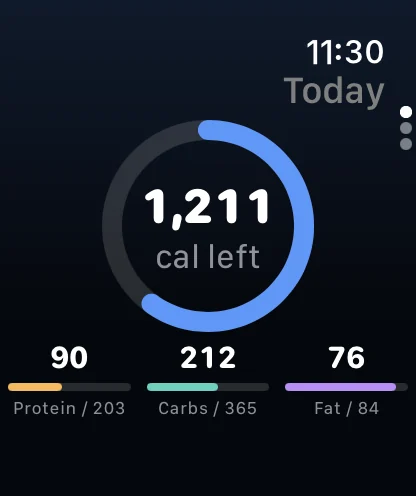
- Today. A ring with the calories you have left, and carbs, fat and protein against their targets, the same numbers as the Home screen on the phone.
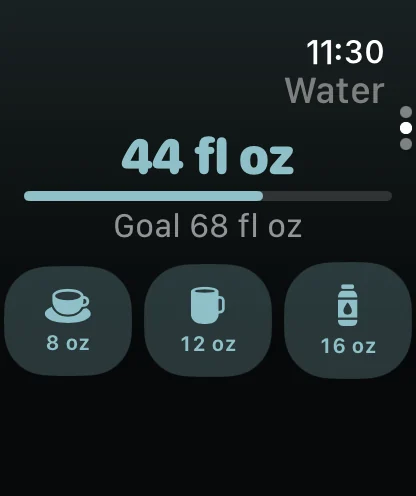
- Water. Today's total against your goal, and three cups to tap: 8, 12 and 16 fl oz (or their mL equivalents when the app is set to metric). A pour shows on the watch at once and lands in Marrow and Apple Health on the phone.
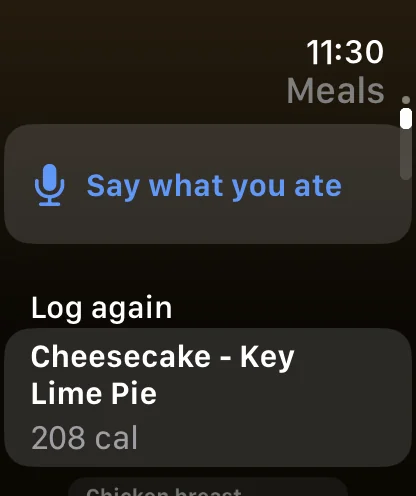
- Meals. Say what you ate opens dictation; the words go to your iPhone, which works out the foods and their nutrition and logs them to the right meal, exactly as a typed description would in the app. Below it, your last meals with Log again for the ones you repeat. Anything you log from the wrist can be undone for ten seconds with the Undo button.
Complications
Two, for any watch face and the Smart Stack: Calories (what is left of today, with the macros where the slot has room) and Water (today's total against the goal; tap to log a pour). They update whenever the phone sends new numbers, which happens after every log and on its background refreshes.
How it works
Every number on the watch comes from the iPhone over Apple's Watch Connectivity: the day's totals, targets and your last meals. The watch app reads nothing from the Health app on the watch, has no Health permission and asks for none. Logs made on the wrist travel the other way, to the phone, which writes them to Marrow and to Apple Health the way the app itself would. Out of range of the phone, logs queue on the watch and land when it reconnects; the Today page keeps showing the last numbers it received.
That design is deliberate: your watch already records heart rate, workouts and sleep into Apple Health, and the phone reads all of that. The watch app's job is the four things you want on the wrist, not a second copy of the data.
Setting it up
- Install Marrow on the iPhone and open it once so it has today's numbers.
- The watch app installs with it when your Watch app is set to install new apps automatically; otherwise open the Watch app on the iPhone, find Marrow under Available Apps, and tap Install.
- Add the complications from the watch face editor, or from the Smart Stack.
Needs watchOS 10 or later, paired with an iPhone on iOS 17 or later.
Widgets on the iPhone
The same glanceable numbers exist on the iPhone's Home Screen and Lock Screen, no watch required. Today shows calories left, with the macros on the wide size and a ring on the Lock Screen; Statistics shows steps, active calories, exercise minutes, sleep and water; Quick log opens straight into a meal scan, a barcode, a description or water; and Streak is a Lock Screen ring for how many days in a row you have logged food. Long-press the Home Screen, tap +, and search for Marrow.
If something looks off
- The watch shows no numbers. Open Marrow on the iPhone once; the watch receives its first snapshot from there. If the phone was restarted, opening the app sends a fresh one.
- A pour or a meal did not reach the phone. It is queued. Bring the watch back in range of the phone, or on the same Wi-Fi, and it is delivered; the Undo button on the watch covers only the first few seconds.
- Say what you ate says the limit is reached. It counts as an AI log, and the free plan includes three a day across photo, text and voice. Marrow Pro removes the limit; Log again and the water cups are never limited.
- Dictation needs a connection. watchOS turns the speech into words; working out the foods happens through the iPhone's food service, so the phone needs internet at that moment.
Privacy on the wrist in one line: the numbers travel between your two devices and nowhere else; the only thing that leaves them is the dictated description, which goes exactly where a typed one goes. The full detail is in the privacy policy.