
Food logging in Marrow
Marrow is a free food log and calorie tracker for iPhone and Apple Watch. You log a meal by taking a photo, saying or typing what you ate, scanning a barcode or searching. Each meal carries 39 nutrients, counts toward your daily targets and is written to Apple Health. There is no account and there are no ads.
Six ways to log a meal
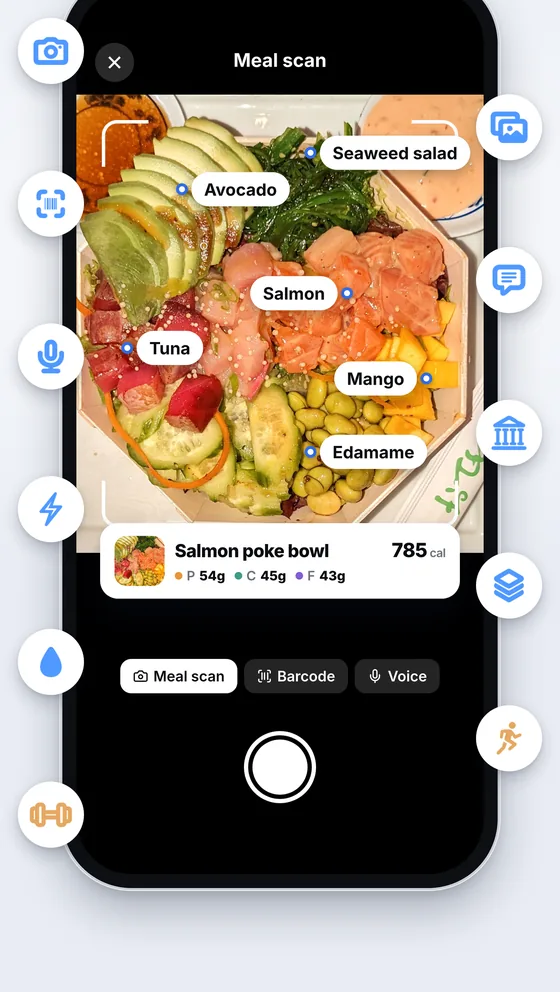
- Meal scan. Take a photo or attach one. Marrow names each food on the plate and estimates its portion, and you correct anything before you save.
- Describe it or say it. Type "two eggs, toast and a coffee with milk", or say it. Marrow works out the foods and the amounts.
- Barcode. Scan a package and the product comes from Open Food Facts. Free, with no daily limit.
- Search and Quick add. Search covers Open Food Facts online and 9,047 USDA foods built into the app, which work with no signal. Quick add takes calories and macros you already know, and New food saves your own.
- My plates. Save a meal you eat often as a plate, with a photo, and log it again in one tap. Save as plate, on the review screen, keeps the meal you are logging as a plate.
- Recently logged and Copy to meal. What you logged lately is one tap away, and Copy to puts a meal on another day.
How to log your first meal
- Install Marrow on an iPhone with iOS 17 or later and allow Apple Health.
- Tap + at the bottom of the screen. The Log sheet has every way in on one screen: food, exercise and weight.
- Pick Meal scan and take a photo of your plate, or type or say what you ate.
- Check the foods and portions Marrow found, set the meal and the time you ate, and save.
- The meal is in your diary, on the Home screen and in Apple Health.
What every meal carries
- 39 nutrients. Calories, protein, carbs and fat, then fiber, sugar, sodium, vitamins and minerals.
- Targets. Daily calories and macros come from your body stats, your activity and your goal: lose weight, build muscle, recomp or maintain. You can set your own numbers.
- Meal timing. Each meal keeps the time you ate it, so a late log still lands at the right hour.
- Apple Health. Everything you log is written to Apple Health under the food's name, where your other apps can read it.
Water and weight
The same Log sheet takes water and your weight. Water has its own page on the Apple Watch. Weight goes to Apple Health and onto your charts on the Data tab.
Restaurants and dining halls
With Marrow Pro, the Log sheet also has menus you can log from in one tap:
- Restaurants. Menus from 51 chains with their published nutrition facts.
- Dining halls. Menus at 46 universities, with the dining program's own calories and macros. See campus dining menus for the schools and halls.
On the Apple Watch
The Apple Watch app shows calories left and macros for today, logs water, and logs a meal again from your recent ones. You can also say what you ate and your iPhone works out the foods.
What is free and what is Pro
| Free | Marrow Pro | |
|---|---|---|
| Meal scan, typed and spoken logging | 3 a day | Unlimited |
| Barcode, search, Quick add, My plates, New food | Unlimited | Unlimited |
| 39 nutrients, targets, water and weight | Yes | Yes |
| Written to Apple Health | Yes | Yes |
| Apple Watch app | Yes | Yes |
| Restaurant menus from 51 chains | No | Yes |
| Campus dining menus at 46 universities | No | Yes |
| Log by chatting with Marrow Coach | No | Yes |
Every new install has Pro for its first 3 days, with nothing to buy and nothing to cancel. The 3 free logs a day reset at your midnight.
Questions
Is there a free calorie tracker for iPhone that logs food from a photo?
Yes. Marrow is free and its meal scan logs a plate from a photo. The free plan includes 3 photo, typed or spoken logs a day, and barcode scanning and search have no limit.
Does Marrow write food to Apple Health?
Yes. Every meal goes to Apple Health with its calories and nutrients, and so do water and weight.
Does the barcode scanner cost anything?
No. Barcode scanning is free and has no daily limit. Products come from Open Food Facts, which is community data, so check a label that looks off.
How accurate is a meal scan?
It is an estimate from a photo. It names the foods and estimates the portions, so check the amounts before you save. A barcode or a search result is the better source for packaged food.
Where does the photo go?
A photo, description or voice log you choose to log with AI is sent for analysis and nothing else goes with it: no health data, no name, no email and no account. The details are in the privacy policy.
Can I log without a signal?
Yes. Search has 9,047 USDA foods built in, and Quick add, My plates and Recently logged work offline. Meal scan, spoken and typed logging need a connection.
I am coming from another food tracker. What is different?
The comparisons are written out line by line: Marrow and MyFitnessPal and Marrow and Cal AI.
Related: Marrow Coach · campus dining menus · Marrow on Apple Watch · MyFitnessPal alternative · Cal AI alternative · logging food to Apple Health with AI · Marrow Pro