
How to get your Apple Health data into ChatGPT
This page covers two ways. ChatGPT has its own Health feature that connects to Apple Health directly, and for many people it is all they need. Marrow Connect is the other way: one link that gives ChatGPT, Claude or Gemini your Marrow data, including the parts Apple Health has no place for, and lets the AI log for you when you ask. We make Marrow, so here are both, set out as fairly as we can.
1. Health in ChatGPT (built in)
OpenAI's Health feature is for logged-in ChatGPT Free, Go, Plus and Pro users in the US who are 18 or older, on the web and on iOS, and it is still rolling out, so some eligible accounts see it later than others. You connect Apple Health from the ChatGPT iPhone app and choose which categories to share. Once the data has synced, you can ask about it anywhere in ChatGPT, including on the web.
It also connects medical records from supported US providers, One Medical and Function Health. The Health tab shows recent data and trends with charts and explanations, and ChatGPT may send a proactive update when it detects a new trend in your Apple Health data. It only reads: OpenAI says ChatGPT cannot write back to Apple Health or change your records.
Set it up
- Update the ChatGPT app on your iPhone and open Health from the sidebar (it may be under More).
- Tap Connect Health or Get started, choose Apple Health, and pick the data categories to share.
- Wait for the sync, which can take a while for a long history, then ask your question. To change the categories later: Health, the ... menu, Apple Health.
What other apps write to Apple Health comes along, within the categories you share. That includes Marrow: it writes every meal and workout you log to Apple Health, so Health in ChatGPT can use their calories and nutrients without Marrow Connect. OpenAI notes that what comes through varies by app and metric.
2. Marrow Connect (Marrow Pro)
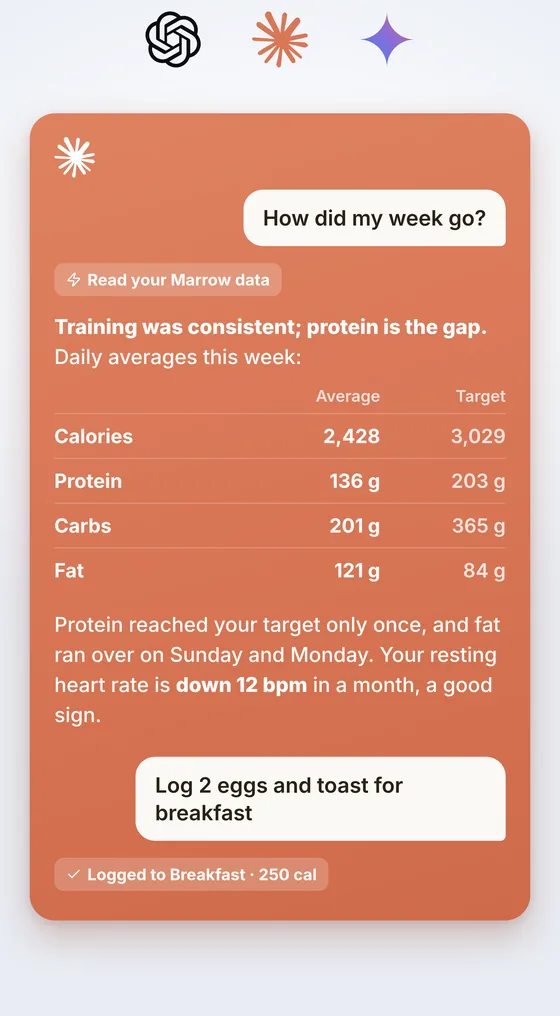
Connect your AI keeps a private copy of your Marrow data on our server and gives you one link to add to your AI. What it adds over Health in ChatGPT:
- Marrow's own records. Every diary entry with the food's name and 39 nutrients, and every lifting set with its weight, reps and estimated one-rep max, through nine read-only tools. Apple Health gets each workout from Marrow, not each set.
- Logging from the chat. Turn on Allow AI write and you can say "log two eggs and toast for breakfast". Your phone applies it the way the app would, writes it to Apple Health and marks it with the AI's name, and anything it did can be undone.
- The same link in Claude and Gemini. Use whichever AI you like, or several.
- Sign-ins you approve. Each AI that connects shows a six-character code that you type into Marrow on your phone; nothing gets a token until you do.
Set it up
- Install Marrow, open the Export tab and turn on Connect your AI. It is part of Marrow Pro, with a 7-day free trial on monthly and yearly.
- On chatgpt.com on a computer, open Plugins, select +, then Add custom MCP server. Give it a name, paste your link as the server URL, set authentication to OAuth, tick the risk acknowledgement and select Create as a plugin. If there is no + button, turn on Developer mode under Settings, Security and login (the steps on Marrow's Connect card still include it). OpenAI moves these menus from time to time, and says custom MCP servers can only be added on the web, not in the mobile app.
- ChatGPT opens a sign-in page with a six-character code. Type it into Marrow and tap Approve.
- Ask away, on the web or in the ChatGPT phone app.
Which ChatGPT plans can add a custom MCP server is up to OpenAI and depends on the plan; our Connect page keeps the current notes, including for Claude and Gemini.
Side by side
| Health in ChatGPT | Marrow Connect | |
|---|---|---|
| Cost | Included in ChatGPT Free, Go, Plus and Pro | Marrow Pro ($4.99 a month, $34.99 a year or $59.99 once), plus a ChatGPT plan that can add a custom MCP server |
| Who can use it | US, 18 or older | Anywhere Marrow is on the App Store (every storefront but mainland China); your AI's own plan and country rules apply |
| Apple Health | The categories you choose | 172 data types, as Marrow reads them |
| Food diary | The nutrients apps write to Apple Health | Every entry, with the food's name and 39 nutrients |
| Lifting sets | Only what apps write to Apple Health | Every set: exercise, weight, reps, estimated one-rep max |
| Medical records | Supported US providers, One Medical, Function Health | No |
| Logging from the chat | No, read only | Yes, once you turn on Allow AI write |
| Charts and trend alerts | The Health tab, and updates when a new trend shows up | Charts live in the Marrow app; the AI answers when you ask |
| Other AIs | ChatGPT only | ChatGPT, Claude and Gemini |
| Model training | Not used to train OpenAI's foundation models | What the AI reads through the link follows your ChatGPT data controls |
| Where the data sits | OpenAI, with extra encryption; deleted within 30 days of disconnecting; chats that used it stay in your history until you delete them | A copy on Marrow's server in the US, deleted at once when you tap Disconnect; what the AI has read stays in your ChatGPT history until you delete those chats |
Checked October 2026 against OpenAI's help center (links under Sources). Health in ChatGPT is still rolling out and its details may change.
Which should you use?
- Health in ChatGPT if you are in the US, use only ChatGPT, and want answers about activity, sleep and heart data, or about your medical records. It is free, built in, and comes with strong privacy terms.
- Marrow Connect if you track food or lifting in detail and want the AI to see each entry, want ChatGPT to log for you, also use Claude or Gemini, or are outside the US.
- Both is fine. They do not get in each other's way, and Marrow's meals reach Health in ChatGPT through Apple Health either way.
- Claude Code, Cursor or another agent on your own machine? That is a different setup, and free: Connect Claude, Cursor or OpenClaw to Apple Health.
A note on privacy
OpenAI gives data connected through Health extra protection: it is not used to train its foundation models or to target ads, whatever your training setting, and it gets additional encryption. Data that reaches ChatGPT through an app or custom connector, Marrow's included, is ordinary chat content. On Free, Go, Plus and Pro, OpenAI says it may use information accessed from apps to train its models if your "Improve the model for everyone" setting is on, so turn that off under Settings, Data Controls if it matters to you.
On our side, Connect keeps a copy of your records on a server in the United States while it is on, and we log only request paths and status codes. Tapping Disconnect deletes the copy and cuts off every connected AI at once. The full detail is on the Connect page and in the privacy policy.
Also compared: MyFitnessPal · Cal AI · Health Auto Export · all guides
Sources
- Health in ChatGPT: who can use it, connecting Apple Health, sources, read only, training, deletion
- Apps in ChatGPT: plan-dependent availability, training on information accessed from apps
- Connecting custom MCP servers in ChatGPT: adding a server from Plugins, web only
Checked October 2026. If something here has changed, write to [email protected] and we will correct it. ChatGPT is a trademark of OpenAI. Apple Health is a trademark of Apple Inc. Claude and Gemini are trademarks of their owners. Marrow is not affiliated with, endorsed by or sponsored by any of them.